
Business automation: not everything repetitive needs to be automated
Before choosing a system, check where the process breaks — and what should stay in human hands.
In this article
A client sends a photo of a document, and you save it, type the details somewhere else, and pass it on to whoever needs to continue from there. This happens in a business that works with notes and files, and also in a business that already has software — because this step was never defined as part of the process, and always gets closed by someone along the way.
Retyping looks like the first thing worth automating. But if it is not clear who receives the document or which details are needed in order to continue, automation will only move the problem along faster. A good strategy starts with the question of where the work loses continuity, and also decides what to leave out of automation.
Business automation: not another task, but a strategy
Business automation is a decision about the way work passes between people, information, and systems — not the purchase of a tool that performs a single action. The important decision is not only what to automate, but which checks and decisions must remain in human hands.
In an office that handles supplier orders, a document arrives as a photo on WhatsApp. An employee saves it, copies the supplier name and the order details into a file, and then passes the details on for approval. This route can exist both when the information sits in folders and when the business uses software to manage orders.
The software may already contain the order details, but not the answer to the operational questions: where the document is kept, who checks that the details were captured, and what to do when they are missing. In such a case, another system does not fix the undefined handover.
Automation for businesses needs to start with a process that has an entry point, ownership, and an end. If the goal is only to make an annoying action disappear, it is easy to turn an unexamined assumption into a rule: that every document is valid, that every order is similar, and that no human check is needed.
For a business that works with files and notes, it is worth checking where information gets recorded again. For a business that already uses software, it is worth looking for where the team completes work outside of it. Automation for small businesses: 3 processes you can automate presents tasks that may be suitable to start with; the right choice depends on your work route.
The position here is simple: automation is not a list of actions to get through. It is a filter that lets you rule out candidates, before the business invests in changing a process or in a new system.
The model for choosing automation processes: identification, mapping, prioritization
Three stages help decide whether a process is suitable for automation: identify a point of friction, map the work from start to finish, and prioritize by the damage to the flow. At every stage you can stop; not every recurring process needs to reach development.
In an office that manages orders, identification starts with the question of why the same details are typed again. Mapping shows who receives the document, who checks it, where the order is recorded, and who is responsible for what follows. Only then do you check whether part of the route can be made automatic.
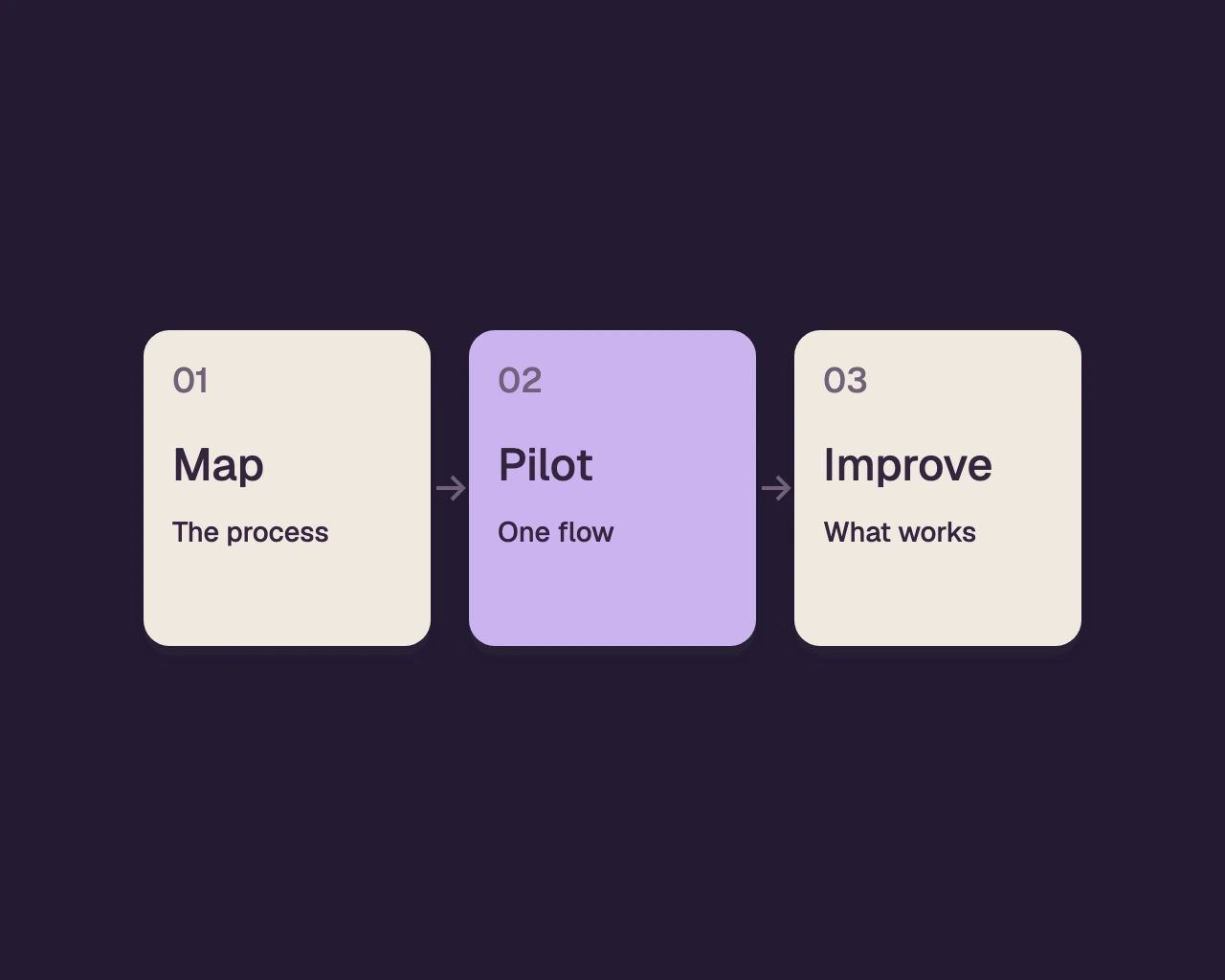
This order prevents choosing a system because of an isolated action, and then adjusting the work to it even when it does not address the problem. An automation strategy is a way to examine ideas against the work as it actually happens, not a collection of suggestions for improvement.
At the identification stage you ask where the work stops or repeats. In mapping you ask what must happen before you can continue. In prioritization you check what the operational cost of leaving the fault in place is, and what the risk is of moving the stage to a system.
You can map a process in a conversation with the person who performs it, on paper or from existing documentation. The tool matters less than the ability to see the whole route, including actions done outside the system. For anyone wondering where to start, business automation: which process to choose first offers a starting point for examination.
If the process does not hold up work, does not cause repetitions, and does not create uncertainty, there may be no reason to touch it. And if no one can explain the decision rules, they need to be clarified before teaching a system to carry them out.
Step 1: Identifying bottlenecks and recurring processes
Look for a place where work waits, information is copied, or responsibility falls between people. An action that repeats is not necessarily a bottleneck; you need to check whether it harms the rest of the work.
In an office that handles orders, you can follow a document from the moment it is received until the order is closed. The document arrives as an image, an employee saves it, the details are typed into a file, and then they are passed for approval. If the approval is delayed because information is missing, the repeated typing is not necessarily the source of the delay.
Check what happens when an essential detail is missing. Does someone request it from the supplier? Does the order remain in the folder with no one responsible? Does the employee fill in what is missing based on prior familiarity? The answers help distinguish between a problem of intake, transfer, responsibility, or decision.
In a business without a system, a conversation with whoever handles the documents may reveal stages that are not written anywhere. In a business with software, compare the official path with the actual work: messages, sheets, and files the team opened to complete the task.
Do not choose a process just because it is common. If an action is performed regularly but does not hold anything up and does not create mistakes, there may be no justification to automate it. In contrast, an unclear transfer of responsibility can be significant even when it happens rarely.
To identify a bottleneck, do not ask only what consumes attention. Ask what is waiting afterward, who cannot move forward, and what information they are missing. That way you can separate an annoying action from a point that truly harms the sequence.
Step 2: Mapping the existing and desired process (before and after automation)
You map the process from start to finish, including who receives information, what is missing before a decision, and how you know the work is done. Then you define a desired path, in which the system handles clear stages and a person remains where inspection or judgment is required.
In the ordering process, the existing situation starts with a photo that arrives in a message. An employee saves it, copies details, looks for the matching order and passes it for approval. If an order number or item description is missing, the handling stops — but possibly no one sees where and why.
In the desired path, you need to determine where the document will be stored, which fields are needed to identify the order, what happens when they are missing, and who receives the clarification request. These decisions determine responsibility and prevent a document from disappearing between an inbox and a folder.
After the required information exists, you can check whether the system can link the document to the order and pass a message to the next role holder. Confirmation of the match should be left to a person when the document is not unambiguous. A similar item may mistakenly be read as identical, and the mistake may continue along the entire path.
The mapping must also include exceptions. What do you do when a duplicate document arrives? How do you continue when the photo is not legible? Who is allowed to correct an incorrect detail? If there is no answer, the desired path is still not defined enough for automation.
In this case, the repetition of typing initially looked like the main problem. The mapping exposed an undefined transition: it was not clear who links the document to the order and who requests the missing detail. You can examine automation for data entry, but defining responsibility for handling the exception is what restores the sequence.
This is how you distinguish between mechanizing an action and streamlining processes. An action may be performed faster without the process improving. Real improvement means the work reaches the right person, with the required information, without assuming every case is identical.
Step 3: Prioritizing processes for automation: where is the biggest impact?
Prioritize by the damage to the sequence, the risk of error and the ability to define clear handling — not by how much the task annoys the team. A prominent action can stay out if it does not hold up work, while a quiet handoff between roles may justify attention.
In an office that receives orders from suppliers, re-typing annoys the employees. But if it is done after the order has been checked and the work continues, it may not be the first candidate. A document that waits without a person responsible for it, on the other hand, may stop the whole handling.
Examine each candidate by three questions: what gets stuck if the process fails? What information or decision is missing at the point of failure? Is it possible to define clear handling, including exceptions? If there is no answer to the last question, automation may turn ambiguity into a message that no one knows how to resolve.
A decision not to automate is also a strategic decision. If every document requires professional interpretation, or the handling changes according to different circumstances, it is better to leave the decision to a person and improve the information that reaches them. The mere repetition of an action is not a sufficient reason.
Good automation starts with what is left to the person.
After prioritization, formulate what needs to change in the work. For example, the person responsible for the order needs to see who is handling it and what is missing in order to move forward. This is an operational goal that can be checked against the process, as opposed to a vague goal like "to introduce automation."
| What you discovered in the mapping | Initial decision | What to check before continuing | What breaks without checking |
|---|---|---|---|
| Information typed again, but the work is not delayed | Leave for now | Does the duplication create an error or only inconvenience | Investment in a change that does not solve a fault |
| A document waiting without an owner | Define responsibility | Who receives the task and what counts as closure | The document remains without handling |
| Missing details recur in the process | Regulate information collection | Which fields are really required and from whom they are requested | The system passes on incomplete requests |
| Matching a document requires judgment | Leave the approval to a person | What information will be shown to the approver | An incorrect match continues onward |
| Clear rules, but there is constant manual tracking | Examine automation | Are the exceptions defined and the data available | Double tracking or inconsistent handling |
When are off-the-shelf solutions enough and when is custom development needed?
An off-the-shelf solution is enough when it supports the stages, fields and exceptions the business needs, without creating a permanent workaround. Custom development is considered when the way the business works does not fit the existing structure and the gap harms process management.
In an office that manages orders, an off-the-shelf product may be enough if you can store a document in it, link it to an order, set who handles it and manage a state of missing information. If the team keeps tracking approvals in a separate spreadsheet, you need to clarify whether this is a habit that can be changed or a real gap in the system.
Another sign of a gap is the same information in several places. An employee updates supplier details in the system, records the approval status in a file and sends a message to clarify that the handling has moved on. Sometimes a change in the settings of the existing product will be enough; sometimes the workflow requires a connection that is not available in it.
Before replacing software or building a system, state the gap precisely. Which field, stage or permission is missing? Does the way the business works require a certain exception? Does the information need to pass to another system and remain documented? Such questions prevent moving to development just because of an inconvenient screen.
A custom system may fit when the process includes unique transitions between customer, document, decision and payment, and existing solutions leave part of the work outside them. A system tailored to the business: 5 signs it's time helps check whether the gap justifies examining such a direction.
Not every mismatch requires a new system. If the process can be adapted without harming service, control or responsibility, an off-the-shelf solution may be the right choice. If the adaptation adds manual work or blurs who is responsible, examine an alternative that fits the actual path.
Implementing automation: not just technology, but organizational change
Implementing automation requires someone responsible for the new process, a way to handle exceptions, and checking what happens in the work itself. Without clear responsibility, even a system that operates according to the settings may leave documents stuck and decisions without an owner.
In an office that handles orders, employees need to know who sees a new document, who approves it, and who handles it when information is missing. These are work rules, not instructions that should be left inside the system alone. It should also be clear what to do when the automatic route does not suit the case.
Include the employees who do the work in the planning. Ask them to go through a complete order and a document with missing information, and to describe where they look for information and how they know the handling is finished. This is how situations are discovered that may disappear in an orderly planning document but do not fit daily work.
Implementation does not end when the new process starts running. Check whether documents reach the right person, whether the team manages tracking in parallel, and whether exceptions receive clear handling. When the answers change, update the work process or the system.
Operational controls should also be part of the planning. A system can include secure login using a one-time code by email and a full activity log: who did what, when, and from which address. This makes it possible to clarify how a record changed and to understand how work progressed.
The customer's data belongs to the customer and can be exported for thirty days after the engagement ends; the software is ours. Decide who handles permissions and information, and how new employees learn the rules. These are operational decisions, not clauses worth postponing until after the system is already in use.
The future of your business: automation as a tool for ongoing growth
An automation strategy is not a one-time decision, because roles, services, and ways of working change. A repeated review makes it possible to see whether the system still supports the flow or whether earlier assumptions no longer fit.
In an office that receives documents, a supplier may change how it sends them, an employee may take on different responsibility, or a simple approval may become complex. With every change, go back to the map and ask whether the entry point is still clear, who is responsible for what follows, and whether human review is still needed.
Automation systems need to be updated when the process changes, not to replace examining it. If a permanent manual action has been added, check whether it is necessary, whether the system is missing a capability, or whether the workflow has changed. If the same exception keeps recurring and is handled the same way, it may be worth defining a permanent step for it.
The test is not how many actions were moved to a machine. Check whether work passes between people and systems without losing information, responsibility, or judgment. A human step that remains on purpose can be a sign of correct planning, not of unfinished automation.
alcyone14 builds for every business one system around the way it already works, with AI built in for routine work, and keeps running and improving it as the business changes. You can read more about software development for businesses and what to define before starting, or examine the options for automation and AI in one business system.
Frequently asked questions
Which process is worth starting with in business automation?
Start with a process where work gets stuck, information is copied over and over, or responsibility is unclear. Follow it from entry to closing, and only then check whether reliable handling of exceptions can also be defined.
What do you do if the business already has software?
Map also the work that happens outside the software, such as tracking in a spreadsheet or passing details in messages. A change in settings may be enough; if the team needs a permanent workaround, check what exactly is missing.
Which tasks are worth leaving to a person?
Leave to a person steps that require judgment or review when the information is partial and not unambiguous. You can automate the collection of information or move a case to review, without automating the decision itself.
When is an off-the-shelf solution enough for a business?
An off-the-shelf solution is enough when it supports the process, the responsibility, and the exceptions the business needs, without creating double entry or a permanent workaround. Examine it against the actual work, and not only against its list of capabilities.
When should you consider custom automation?
Consider a custom system when the process includes unique transitions that an off-the-shelf product does not support, and the gap harms tracking or the continuation of the work. Before deciding, formulate the point of failure and the steps the system needs to manage.
Which tasks could you automate?
Tell us about the repetitive work in your business, and we’ll explore where automation could help.
Let’s talk about your system